LogiFlow
Logistics and delivery management platform in Java and Spring Boot: orders with sagas, live tracking, incidents, SLA and a driver app
- My role
- UX/UI Designer · Architecture analysis
 LogiFlow
Context
LogiFlow is a logistics and delivery management platform for carriers and last-mile operations: orders, picking at distribution centers, fleet, routes, incidents and SLA in a single operation, from order to customer's door, with an app for drivers.
I did the product, the UX/UI and the architecture analysis. The technical foundation is FTGO, the Java and Spring Boot microservices architecture from the book Microservices Patterns, with sagas, a transactional outbox and CQRS; on top of it I designed the logistics rules, flows, screens and design system.
Business problem
In a delivery operation, an order goes through many hands: the customer who buys, finance who approves, the distribution center that picks, the driver who delivers. Each step usually lives in a different system or spreadsheet, and the coordinators only find out about a delay when the customer calls.
LogiFlow brings it all into a single operation: it shows what will be late before it is late, handles failed deliveries with clear rules and gives drivers an app that works even without signal.
The technical foundation
From FTGO come the Spring Boot services: orders with a lifecycle driven by sagas (create, cancel and revise), approval against the customer's account, a picking ticket with states, couriers with availability and a pickup and drop-off plan, order history in CQRS, an API Gateway and Swagger docs for each service.
The LogiFlow product
The last-mile logistics layer and the entire interface: distribution centers, fleet, live tracking, incidents with an attempt limit, SLA per delivery window, management dashboard, reports, access roles and the driver app.
Architecture
Each service is a Spring Boot application with its own database. Writes that span more than one service become sagas orchestrated by the Order Service, and events go out through Apache Kafka with a transactional outbox: the event is stored in the same transaction as the data and published afterwards, so nothing is lost between the database and the queue. Alongside, how each FTGO concept becomes a LogiFlow concept.
Architecture decisions and trade-offs
Six decisions recorded as ADRs: the context, what was decided, what each one costs and how it shows up for the people using the product.
Information architecture and flows
Before the screens: the product map, the five access roles and the three flows that matter most: from order to delivery, a failed delivery, and revising or cancelling an order.
The screens in Figma
Twelve desktop screens with a clickable prototype, for the people who coordinate the operation.
- 01 / 10
Operations dashboard
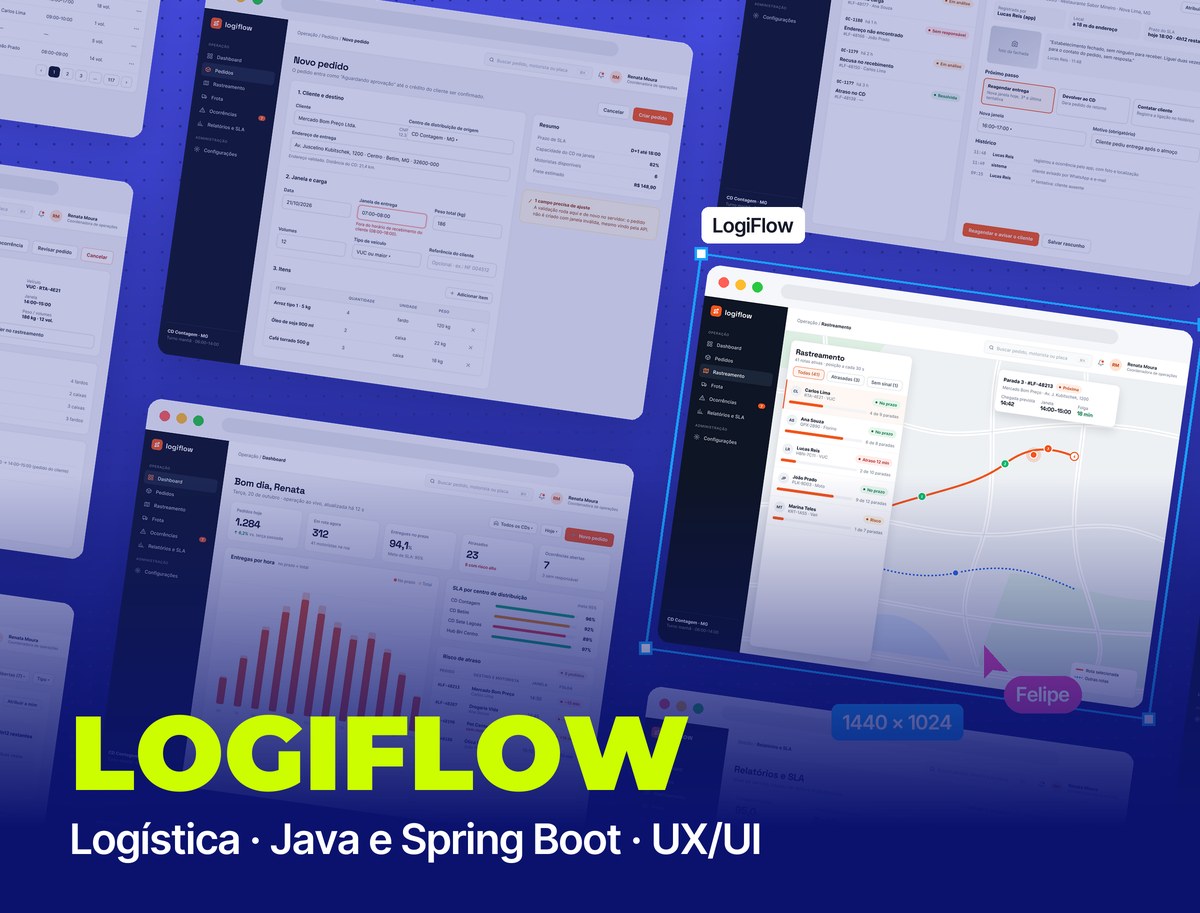
The first screen answers “what will go wrong today?”: orders of the day, routes on the road, on-time deliveries against target, delays and open incidents, each distribution center's SLA and the list of orders at risk of delay, with the margin in minutes.
- 02 / 10
Orders
Search, filters by status, center, window and driver, sorting and pagination. Each status has a fixed color, and awaiting approval, approved and rejected are the order's actual states in the Order Service.
- 03 / 10
Order detail
The order lifecycle as a timeline, with the saga and picking ticket steps, the driver's plan with each pickup and drop-off (the Delivery Service Plan), the SLA margin, the items and the audit trail of who changed what.
- 04 / 10
New order
The form explains that the order starts as awaiting approval, because that is what the saga does. A window outside the customer's receiving hours is blocked at the field, and the summary notes that the same validation runs on the server.
- 05 / 10
Live tracking
Active routes with each driver's progress, filters for late ones and those without signal, and on the map the selected route with completed stops, the next one and the margin until the end of the window.
- 06 / 10
Incidents
The queue of delivery problems and how each is handled: who reported it, the photo, the distance from the address, the SLA deadline and three possible outcomes. Rescheduling requires a reason, and the third attempt is the last.
- 07 / 10
Reports and SLA
On-time deliveries per week against target, failure causes and productivity per driver, read from the CQRS view so they don't weigh on the operation.
- 08 / 10
Fleet
Drivers and vehicles with shift availability, which comes from the Delivery Service, plus each driver's vehicle, license and on-time performance.
- 09 / 10
Users and permissions
The permission matrix by role, enforced in the API and not only in the UI. B2B customers and drivers see only their own orders.
- 10 / 10
Sign-in
Sign-in by email or company single sign-on (OIDC), with lockout after failed attempts. Account recovery uses a neutral message that doesn't reveal who has an account.
Interface states
Loading, empty, error and action feedback. The error keeps the filters and shows a code for support, and the rejected and in-progress notices come straight from the saga states.
Driver app
The courier plan is an ordered list of pickups and drop-offs. The app turns that list into the day's route, with proof of delivery by photo, signature and location, and an incident report that is saved offline and syncs when the signal returns.
UX/UI decisions
What guided the interface choices:
Visual System
A custom design system in Figma, with color, spacing and radius variables, text styles and components with variants: button, order status, input, menu item, filter and KPI card. Cool neutrals for long reading, orange for action and one color per status.
Palette
Signal Orange
#F2551D
Main action and alerts
Night
#0E1525
Side menu
Ink
#101828
Headings and text
Delivered Green
#067647
Delivered and on time
Picking Purple
#5B3CC4
Being picked at the DC
Failure Red
#B42318
Delay and failed attempt
Typography
Space Grotesk
700
Headings and KPI numbers
Inter
400 / 500 / 600 / 700
Interface, tables and forms
JetBrains Mono
400 / 700
Order codes and times
Next versions
What comes next on the product roadmap:
References and credits
LogiFlow's technical foundation is FTGO, by Chris Richardson and Eventuate, Inc., published under the Apache 2.0 license.
Takeaways
Designing on top of a real architecture changes the interface: eventual consistency becomes an “in progress” state, saga compensation becomes a rejection reason, and the read/write split defines where lists and reports live.