Tintaê
Booking app for tattoo studios: from the reference to a confirmed slot with the artist, in a few taps
- My role
- UX/UI Designer
 Tintaê
Context
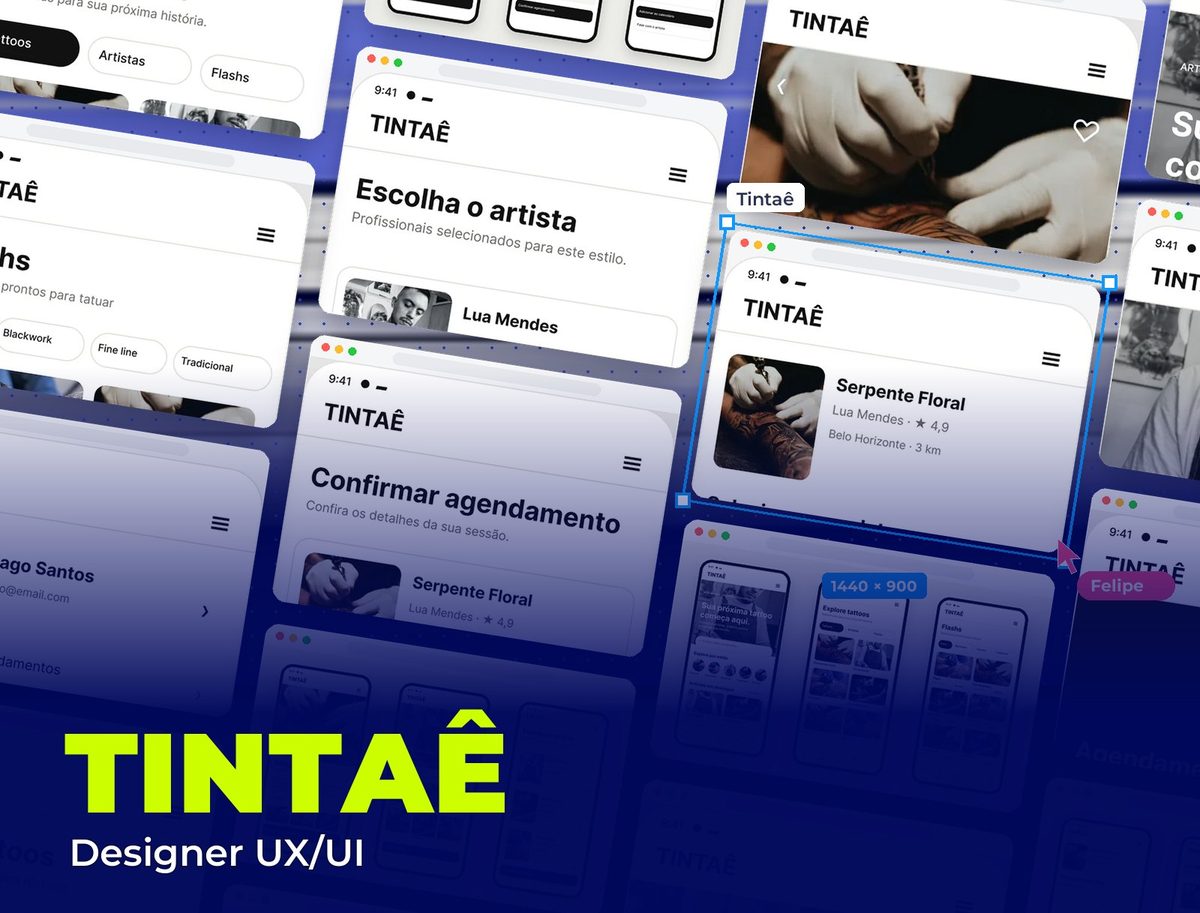
Tintaê is a booking app for tattoo studios. It brings together in one place what's usually scattered across Instagram, DMs and WhatsApp: finding references, getting to know each artist's work, browsing ready-made designs (flashes) with prices and booking the session. I did the flow UX and the UI for every screen, from first contact to confirmation.
Challenge
People getting a tattoo usually arrive with a saved reference and lots of questions: which artist does this style, how long it takes, how much it costs, when they can book. Today that turns into a long DM conversation. The app had to answer those questions in the order they come up and lead to a confirmed slot, without losing the feel of an independent studio that makes people trust the artist.
The flow, step by step
White background, black type and the tattoo photos as the only element of color. On every screen, a short title and a black primary button leading to the next step.
- 01 / 03
Discovery
The home screen opens with the line “Your next tattoo starts here.”, a black-and-white studio photo and a search by artist, style or design. Right below, styles in circles (fine line, blackwork, realism, traditional, oriental) and featured artists with rating and city. Explore and Flashes organize references in a two-column grid, with pill filters and, for flashes, the price of each ready-made design.
- 02 / 03
From the tattoo to the artist
The tattoo screen shows the large photo, tags, the story behind the design, the estimated duration and the body area, with a single button: “Book this tattoo”. Next, people compare artists in cards with a portrait, styles, rating, number of reviews and distance, and can open the full profile with portfolio, about and reviews before deciding.
- 03 / 03
Booking
The tattoo and artist summary stays at the top while people pick the day on the calendar and the time from chips. The confirmation brings date, time, duration and location together in a single card, notes that the artist will get in touch to go over the details and aftercare, and the final screen offers to add it to the calendar or message the artist.
All screens
The app's 10 screens, with the fixed navigation bar (Home, Explore, Saved, Schedule and Profile) on the discovery screens and the user profile bringing together bookings, saved tattoos, followed artists and payment.
Visual System
An almost monochrome interface so the artists' work is the color on screen: black for headings, buttons and selected items, a white background, warm gray for supporting text and lines, and off-white only for notices. Inter in three weights sets an editorial tone without competing with the photos.
Palette
Ink Black
#121211
Headings, primary buttons and selected items
White
#FFFFFF
Screen and card backgrounds
Graphite Gray
#6B6B66
Supporting text, captions and icons
Line Gray
#E3E3DE
Card borders, fields and dividers
Off-white
#F5F5F2
Notices and soft highlight areas
Typography
Inter
400 / 500 / 700
A single typeface: bold headings, medium buttons, regular text
Takeaways
In a tattoo app, the artist's work is what sells. Taking color out of the interface and letting the photos fill the space made every screen feel like a portfolio, and keeping a single button per screen turned a long DM conversation into six short steps to a booked slot.
Other projects to explore.
 App · Events
iPass
Document and facial biometrics registration app for event entry, made at Ivy
See project App · Aviation & Pets
MIA Pet
Miami International Airport app for travelers with pets: pet digital ID, check-in and partners, made at Ivy
See project E-commerce & Pet
Manada Animal
Pet shop e-commerce and digital experience
See project